
We go to develop a type mario bros 2d videogame for we to have a introduction to this magical world. We go to do this in JAVA and OpenGL, this is, JOGL:
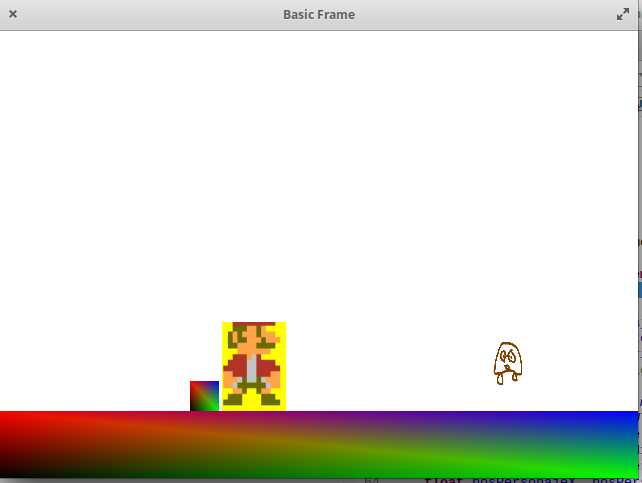
The videogame is composed of five phases to be programmed: the elements graphics (the character, the scenary, the blocks or walls), the controls, collision detection, the logic of the videogame and textures.
First, and to be able of testing, we are going to load the graphics, the scenary, the main character, the block or wall and the enemy. We go to starting with the elements graphics, we will continue with the textures, after we will have the controls, and to finalize we will have collision detection plus the videogame logic.
From a sprite sheet of mario bros, we get two sprites of mario for our videogame: one, of mario in normal state:

, and two, of mario junping:

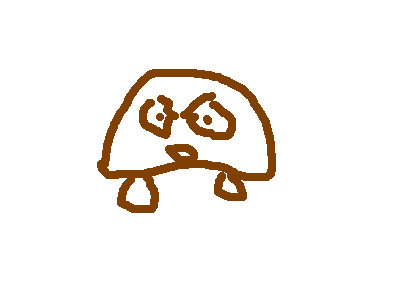
. Furthermore, we have an image of goomba, the enemy:
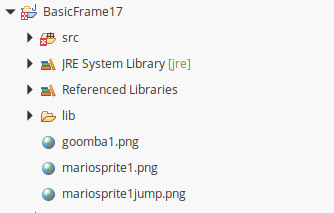
The images are saved at the highest hierarchy level inside of the project:
The coding.
We go to utilize the framework eclipse for linux or for windows. First, we are going to create a empty JAVA project in eclise:
Second, we need some libraries, we are going to download the JOGL “library” that contains four libraries for linux: gluegen-rt.jar, jogl-all.jar, jogl-all-natives-linux-amd64.jar and gluegen-rt-natives-linux-amd64.jar and for windows also will be four: gluegen-rt.jar, jogl-all.jar, jogl-all-natives-windows-amd64.jar and gluegen-rt-natives-windows-amd64.jar. From here: https://jogamp.org/wiki/index.php/Downloading_and_installing_JOGL#Using_the_fat_jar , from this link: https://jogamp.org/deployment/jogamp-current/archive/jogamp-all-platforms.7z
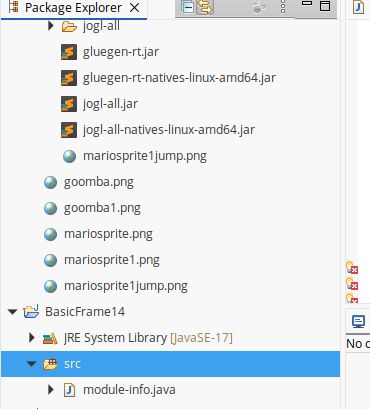
Once downloaded the four libraries, we create in our project, the folder lib, where we copy dragging and dropping the four libraries:
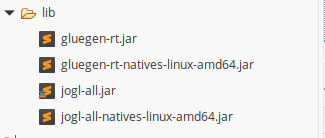
Now, leave the folder src empty, that is without the module-info.java created by default. And we create in src folder the JAVA Class: BasicFrame15.java.
And we do on the .jars the next: Mouse right buttom->Build Path->Add to Build Path (On the four .jar libraries). Finally we have the four libraries expand in another four (in this case, it is for linux, (for windows, it would be analogous):
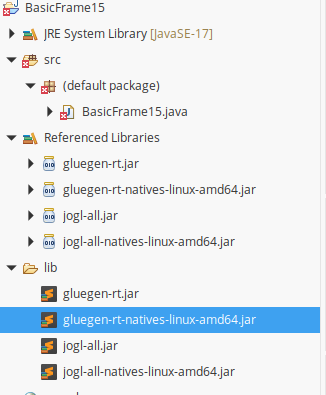
Now, we are in position of beginning to code our videogame:
On the name of the Java Class we add “implements GLEventListener”, adding more up also the reference to the corresponding library: “import com.jogamp.opengl.GLEventListener”; Then, it will be said that it must be implemented the abstract method display, dispose and reshape:
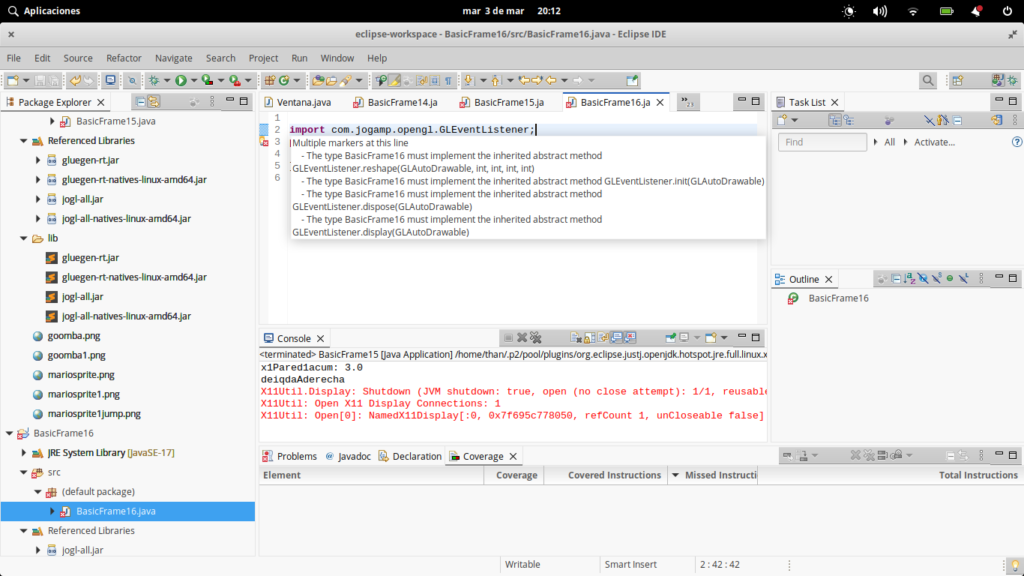
This three methods are necessary to implement for run an OpenGL Java (JOGL) application.
Also we need to implement the main method, that it will have the assignment of five keys with the five variables corresponding to miraarriba, miraabajo, miraarriba, muevederecha, mueveizquierda y saltar, it five variables are created as global variables; In addition, we size the canvas, that it also is created here and associated to a instance of this class BasicFrame:
import java.awt.Frame;
import java.awt.event.KeyEvent;
import java.awt.event.KeyListener;
import java.awt.event.WindowAdapter;
import java.awt.event.WindowEvent;

import com.jogamp.opengl.GLCapabilities;
import com.jogamp.opengl.GLEventListener;
import com.jogamp.opengl.GLProfile;
import com.jogamp.opengl.awt.GLCanvas;
import com.jogamp.opengl.util.Animator;
public class BasicFrame16 implements GLEventListener{
	static boolean lookup, lookdown, movetoleft, movetoright, jump;
	public static void main(String[] args) {


	      //getting the capabilities object of GL2 profile
	      final GLProfile profile = GLProfile.get(GLProfile.GL2);
	      GLCapabilities capabilities = new GLCapabilities(profile);

	      // The canvas
	      final GLCanvas glcanvas = new GLCanvas(capabilities);
	      BasicFrame16 b = new BasicFrame16();
	      glcanvas.addGLEventListener(b);
	      //glcanvas.addKeyListener( new BasicFrame4());

	      glcanvas.setSize(400, 400);

	      //creating frame
	      final Frame frame = new Frame (" Basic Frame");

	      frame.addKeyListener(new KeyListener(){
	    	  public void keyPressed(KeyEvent ke)
	    		{
	    			switch(ke.getKeyCode())
    			{
    			case KeyEvent.VK_CONTROL:jump = true;
    			System.out.println(movetoright);
    			break;
    			case KeyEvent.VK_DOWN:lookdown = true;
    			break;
    			case KeyEvent.VK_UP:lookup = true;
    			break;
    			case KeyEvent.VK_LEFT:movetoleft = true;
    			System.out.println(movetoleft);
    			break;
    			case KeyEvent.VK_RIGHT:movetoright = true;
    			System.out.println("movetoright: "+movetoright);
    			break;
    			}
	    		}

	    		public void keyReleased(KeyEvent ke)
	    		{
	    		}

	    		public void keyTyped(KeyEvent ke)
	    		{

	    		}
	      });
	      final Animator animator = new Animator(glcanvas);
	      frame.addWindowListener(new WindowAdapter() {

	    	  @Override
	          public void windowClosing(WindowEvent e) {
	             // Use a dedicate thread to run the stop() to ensure that the
	             // animator stops before program exits.
	             new Thread() {
	                @Override
	                public void run() {
	                   if (animator.isStarted()) animator.stop();
	                   System.exit(0);
	                }
	             }.start();
	          }
	      });
	      animator.start();

	      //adding canvas to frame
	      frame.add(glcanvas);
	      //frame.setExtendedState(Frame.MAXIMIZED_BOTH);
	      frame.setSize( 640, 480 );
	      frame.setVisible(true);


	}
}
Now, we are going to create the display method( this method is used for print the graphics in screen). For what also we do use of a method called init() that it will serve for initialize global variables that we go creating in the BasicFrame context.
The first that we go to do in this display method is to change the position of the main character depending of that variable (muevederecha or mueveizquierda) boolean is activated for the main method.
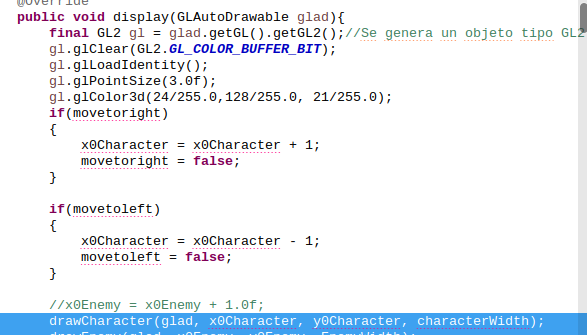
Furthermore, we declare two methods relatives with the display method (even more with the GLEventListener or the interface of JOGL application), the dispose method, for free memory after his use, and the reshape method, for redimensionating the working space in real time.
So is how our videogame goes for now:
import java.awt.Frame;
import java.awt.event.KeyEvent;
import java.awt.event.KeyListener;
import java.awt.event.WindowAdapter;
import java.awt.event.WindowEvent;
import java.io.File;
import java.io.IOException;
import java.io.InputStream;

import com.jogamp.opengl.GL2;
import com.jogamp.opengl.GLAutoDrawable;
import com.jogamp.opengl.GLCapabilities;
import com.jogamp.opengl.GLEventListener;
import com.jogamp.opengl.GLProfile;
import com.jogamp.opengl.awt.GLCanvas;
import com.jogamp.opengl.glu.GLU;
import com.jogamp.opengl.util.Animator;
import com.jogamp.opengl.util.texture.TextureData;
import com.jogamp.opengl.util.texture.TextureIO;

public class BasicFrame16 implements GLEventListener{
	GL2 gl;
	GLU glu;
	static boolean lookup, lookdown, movetoleft, movetoright, jump;
	@Override
    public void display(GLAutoDrawable glad){
    	final GL2 gl = glad.getGL().getGL2();//Se genera un objeto tipo GL2
    	gl.glClear(GL2.GL_COLOR_BUFFER_BIT);
    	gl.glLoadIdentity();
    	gl.glPointSize(3.0f);
    	gl.glColor3d(24/255.0,128/255.0, 21/255.0);
    	if(movetoright)
    	{
    		x0Character = x0Character + 1;
    		movetoright = false;
    	}

    	if(movetoleft)
    	{
    		x0Character = x0Character - 1;
    		movetoleft = false;
    	}
	}

	 @Override
	   public void dispose(GLAutoDrawable arg0) {
	      //method body
	   }

	 @Override
	   public void reshape(GLAutoDrawable arg0, int arg1, int arg2, int arg3, int arg4) {

	   }

	@Override
	   public void init(GLAutoDrawable glad){
	       final GL2 gl = glad.getGL().getGL2(); //Se genera un objeto de tipo GL2
	       final GLU glu = new GLU(); //Se genera un objeto de tipo GLU
	       incx=incy=0;
	       muevederecha=false;
	       mueveizquierda=false;
	       saltar=false;

	   }

	public static void main(String[] args) {


	      //getting the capabilities object of GL2 profile
	      final GLProfile profile = GLProfile.get(GLProfile.GL2);
	      GLCapabilities capabilities = new GLCapabilities(profile);

	      // The canvas
	      final GLCanvas glcanvas = new GLCanvas(capabilities);
	      BasicFrame16 b = new BasicFrame16();
	      glcanvas.addGLEventListener(b);
	      //glcanvas.addKeyListener( new BasicFrame4());

	      glcanvas.setSize(400, 400);

	      //creating frame
	      final Frame frame = new Frame (" Basic Frame");

	      frame.addKeyListener(new KeyListener(){
	    	  public void keyPressed(KeyEvent ke)
	    		{
	    			switch(ke.getKeyCode())
    			{
    			case KeyEvent.VK_CONTROL:jump = true;
    			System.out.println(movetoright);
    			break;
    			case KeyEvent.VK_DOWN:lookdown = true;
    			break;
    			case KeyEvent.VK_UP:lookup = true;
    			break;
    			case KeyEvent.VK_LEFT:movetoleft = true;
    			System.out.println(movetoleft);
    			break;
    			case KeyEvent.VK_RIGHT:movetoright = true;
    			System.out.println("movetoright: "+movetoright);
    			break;
    			}
	    		}

	    		public void keyReleased(KeyEvent ke)
	    		{
	    		}

	    		public void keyTyped(KeyEvent ke)
	    		{

	    		}
	      });
	      final Animator animator = new Animator(glcanvas);
	      frame.addWindowListener(new WindowAdapter() {

	    	  @Override
	          public void windowClosing(WindowEvent e) {
	             // Use a dedicate thread to run the stop() to ensure that the
	             // animator stops before program exits.
	             new Thread() {
	                @Override
	                public void run() {
	                   if (animator.isStarted()) animator.stop();
	                   System.exit(0);
	                }
	             }.start();
	          }
	      });
	      animator.start();

	      //adding canvas to frame
	      frame.add(glcanvas);
	      //frame.setExtendedState(Frame.MAXIMIZED_BOTH);
	      frame.setSize( 640, 480 );
	      frame.setVisible(true);


	}
}
In the display() method we do four callings to four fuctions declared out of the display() method that in code inline would be inside of the display() method that print the graphics of the scenary, of the main character, of the enemy and the of the block or wall:
/*after of the controls graphic effect in the display me thod():*/
drawCharacter(glad, x0Character, y0Character, characterWidth);
    	drawEnemy(glad, x0Enemy, y0Enemy, EnemyWidth);
    	drawStage(glad, x0Stage, y0Stage, stageWidth, stageHeight);
    	drawWall1(glad, x0Wall1, y0Wall1, wall1Width, wall1Height);
public void drawStage(GLAutoDrawable glad, float x1, float y1, float width, float height) {
final GL2 gl = glad.getGL().getGL2(); //Se carga el elemento GL
gl.glLoadIdentity(); // Reset The View
gl.glPointSize(12f);
gl.glBegin(GL2.GL_QUADS);//Se comienza a dibujar los puntos
gl.glColor3f(1, 0, 0);//Se activa el color rojo
gl.glVertex2f(x1, y1+height); //Se dibuja el punto
gl.glColor3f(0, 0, 1);//Se activa el color azul
gl.glVertex2f(x1+width, y1+height);
gl.glColor3f(0, 1, 0);//Se activa el color verde
gl.glVertex2f(x1+width, y1);
gl.glColor3f(0, 0, 0);//Se desactivan todos los colores
gl.glVertex2f(x1, y1);
gl.glEnd();
}
public void drawWall1(GLAutoDrawable glad, float x1, float y1, float width, float Wall1height) {
final GL2 gl = glad.getGL().getGL2(); //Se
gl.glLoadIdentity(); // Reset The View
gl.glPointSize(12f);
gl.glBegin(GL2.GL_QUADS);//Se comienza a dibujar los puntos
gl.glColor3f(1, 0, 0);//Se activa el color rojo
gl.glVertex2f(x1, y1+Wall1height*1.5f); //Se dibuja el punto
gl.glColor3f(0, 0, 1);//Se activa el color azul
gl.glVertex2f(x1 + width, y1+Wall1height*1.5f);
gl.glColor3f(0, 1, 0);//Se activa el color verde
gl.glVertex2f(x1+width, y1);
gl.glColor3f(0, 0, 0);//Se desactivan todos los colores
gl.glVertex2f(x1, y1);
gl.glEnd();
}
public void drawCharacter(GLAutoDrawable glad, float x1, float y1, float width) {
final GL2 gl = glad.getGL().getGL2(); //Se carga el elemento GL
gl.glLoadIdentity(); // Reset The View
gl.glPointSize(12f);
/*GLQUADS ORDER: top left.
top right.
bottom right.
bottom left*/
//x1 = x1 + incx;
if(jump) {y0Character = y0Character + characterHeight * 2.0f;jump=false;
ground=false;falling=true;}
else if(falling)
{
while(falling)
{
y0Character = y0Character - 0.1f;
if(checkCollisionWall1()) //falling (en y0)collision with superior part of Wall1
{
heClimbedOntoAWall=true;
falling=false;
ground = true;
}
if(checkCollisionStageFloor())
{
falling=false;
ground=true;
}
if(checkCollisionCharacterAndEnemy())
{
if(y0Character >= y0Enemy + EnemyHeight-1.0f) //(-1.0f)El pixel-primera fila del Personaje al tocar con la y0Enemy+EnemyHeight
{
x0Enemy = x0Enemy + 120.0f;
}
falling = false;
}
}
//falling=false;
//ground = true;
}
gl.glEnable(GL2.GL_TEXTURE_2D);
if((jump)||(falling))
{
t2.enable(gl);
t2.bind(gl);
}
else{
t.enable(gl);
t.bind(gl);
}
gl.glBegin(GL2.GL_QUADS);//Se comienza a dibujar los puntos
gl.glColor4f(1.0f, 1.0f, 1.0f, 1.0f);//Se activa el color rojo
gl.glTexCoord2f(0.0f, 1.0f);
gl.glVertex2f(x1, y1+width+width); //Se dibuja el punto
//gl.glColor3f(1, 0, 0);//Se activa el color azul
gl.glTexCoord2f(1.0f, 1.0f);
gl.glVertex2f(x1+width, y1+width+width);
gl.glTexCoord2f(1.0f, 0.0f);
gl.glVertex2f(x1+width, y1);
gl.glTexCoord2f(0.0f, 0.0f);
gl.glVertex2f(x1, y1);
gl.glEnd();
}
public void drawEnemy(GLAutoDrawable glad, float x1, float y1, float width) {
final GL2 gl = glad.getGL().getGL2(); //Se
gl.glPointSize(12f);
/*GLQUADS ORDER: top left.
top right.
bottom right.
bottom left*/
gl.glEnable(GL2.GL_TEXTURE_2D);
//t3.enable(gl);
t3.bind(gl);
gl.glBegin(GL2.GL_QUADS);//Se comienza a dibujar los puntos
gl.glColor4f(1.0f, 1.0f, 1.0f, 1.0f);//Se activa el color rojo
gl.glTexCoord2f(0.0f, 1.0f);
gl.glVertex2f(x1, y1+width+width); //Se dibuja el punto
gl.glTexCoord2f(1.0f, 1.0f);
gl.glVertex2f(x1+width, y1+width+width);
gl.glTexCoord2f(1.0f, 0.0f);
gl.glVertex2f(x1+width, y1);
gl.glTexCoord2f(0.0f, 0.0f);
gl.glVertex2f(x1,y1);
gl.glEnd();
}glad is a functions loader and it is passed by value to call to
getGL and getGL2 functions.
For testing our videogame we need the sprites for the main character and for the enemy ready. Then, we going to loading the three textures, the main character plain behaviour texture, the main character jumping texture and the texture for the enemy. This we are going to do in the init() function(after of be loaded in the init fucntion, the textures will be activate or deactivate in the function display, in display function for the main character (dibujaPersonaje(), with two different textures) and in the display function for the enemy (dibujaEnemy(), with one different texture)):
gl.glMatrixMode(GL2.GL_PROJECTION);//Modo de proyección
gl.glClearColor(1.0f, 1.0f, 1.0f, 0.0f); //fondo blanco
glu.gluOrtho2D(0.0, 10.0, 0.0, 10.0);//-10 a 10 en x y -10 a 10 en y
gl.glMatrixMode(GL2.GL_MODELVIEW);
gl.glLoadIdentity(); //Se cololoca la matriz identidad
gl.glEnable(GL2.GL_BLEND);//para activar canal alpha trnsparen
gl.glEnable(GL2.GL_TEXTURE_2D); //carga texturas:
try {
File in = new File("mariosprite1.png");
InputStream stream = getClass().getResourceAsStream("mariosprite1.png");
TextureData data = TextureIO.newTextureData(gl.getGLProfile(),in, GL2.GL_RGBA16, GL2.GL_RGBA, false, "png");
t = TextureIO.newTexture(data);
}catch(IOException e) {
e.printStackTrace();
System.exit(1);
}
try {
gl.glEnable(GL2.GL_TEXTURE_2D); //carga texturas:
//carga texturas:
File in2 = new File("mariosprite1jump.png");
InputStream stream2 = getClass().getResourceAsStream("mariosprite1jump.png");
TextureData data2 = TextureIO.newTextureData(gl.getGLProfile(),in2, GL2.GL_RGBA16, GL2.GL_RGBA, false, "png");
t2 = TextureIO.newTexture(data2);
}catch(IOException e) {
e.printStackTrace();
System.exit(2);
}
try {
gl.glEnable(GL2.GL_TEXTURE_2D); //carga texturas:
File in3 = new File("goomba1.png");
InputStream stream3 = getClass().getResourceAsStream("goomba1.png");
TextureData data3 = TextureIO.newTextureData(gl.getGLProfile(),in3, GL2.GL_RGBA16, GL2.GL_RGBA, false, "png");
t3 = TextureIO.newTexture(data3);
goomba = TextureIO.newTexture(new File("goomba1.png"), true)
}catch(IOException e) {
e.printStackTrace();
System.exit(2);
}And the code for the display functions drawCharacter and for drawEnemy is:
public void drawCharacter(GLAutoDrawable glad, float x1, float y1, float width) {
final GL2 gl = glad.getGL().getGL2(); //Se carga el elemento GL
gl.glLoadIdentity(); // Reset The View
gl.glPointSize(12f);
/*GLQUADS ORDER: top left.
top right.
bottom right.
bottom left*/
//x1 = x1 + incx;
if(jump) {y0Character = y0Character + characterHeight * 2.0f;jump=false;
ground=false;falling=true;}
else if(falling)
{
while(falling)
{
y0Character = y0Character - 0.1f;
if(checkCollisionWall1()) //falling (en y0)collision with superior part of Wall1
{
heClimbedOntoAWall=true;
falling=false;
ground = true;
}
if(checkCollisionStageFloor())
{
falling=false;
ground=true;
}
if(checkCollisionCharacterAndEnemy())
{
if(y0Character >= y0Enemy + EnemyHeight-1.0f) //(-1.0f)El pixel-primera fila del Personaje al tocar con la y0Enemy+EnemyHeight
{
x0Enemy = x0Enemy + 120.0f;
}
falling = false;
}
}
//falling=false;
//ground = true;
}
gl.glEnable(GL2.GL_TEXTURE_2D);
if((jump)||(falling))
{
t2.enable(gl);
t2.bind(gl);
}
else{
t.enable(gl);
t.bind(gl);
}
gl.glBegin(GL2.GL_QUADS);//Se comienza a dibujar los puntos
gl.glColor4f(1.0f, 1.0f, 1.0f, 1.0f);//Se activa el color rojo
gl.glTexCoord2f(0.0f, 1.0f);
gl.glVertex2f(x1, y1+width+width); //Se dibuja el punto
//gl.glColor3f(1, 0, 0);//Se activa el color azul
gl.glTexCoord2f(1.0f, 1.0f);
gl.glVertex2f(x1+width, y1+width+width);
gl.glTexCoord2f(1.0f, 0.0f);
gl.glVertex2f(x1+width, y1);
gl.glTexCoord2f(0.0f, 0.0f);
gl.glVertex2f(x1, y1);
gl.glEnd();
}
public void drawEnemy(GLAutoDrawable glad, float x1, float y1, float width) {
final GL2 gl = glad.getGL().getGL2(); //Se
gl.glPointSize(12f);
/*GLQUADS ORDER: top left.
top right.
bottom right.
bottom left*/
gl.glEnable(GL2.GL_TEXTURE_2D);
//t3.enable(gl);
t3.bind(gl);
gl.glBegin(GL2.GL_QUADS);//Se comienza a dibujar los puntos
gl.glColor4f(1.0f, 1.0f, 1.0f, 1.0f);//Se activa el color rojo
gl.glTexCoord2f(0.0f, 1.0f);
gl.glVertex2f(x1, y1+width+width); //Se dibuja el punto
gl.glTexCoord2f(1.0f, 1.0f);
gl.glVertex2f(x1+width, y1+width+width);
gl.glTexCoord2f(1.0f, 0.0f);
gl.glVertex2f(x1+width, y1);
gl.glTexCoord2f(0.0f, 0.0f);
gl.glVertex2f(x1,y1);
gl.glEnd();
}Where t.enable(gl), t.bind(gl) with gl.glEnable(GL2.GL_TEXTURE_2D) are the only trhee instructions that do possible the activation and deactivation(and the main character case) of the textures. trhee of this class of instructions by each time that we want to show a texture as visible. To do active one of the textures do that the texture said is shown as visible in the foreground instead of the other texture.
And now and before of implement the collisions detection code, our code (of our videogame in OpenGL JAVA or JOGL) with the controls (from main.java and from the display function), with the graphic elements shown in the videogame and with the textures activating himself and deactivating (in the main character case as is said more up) himself and depending on what interest us is so:
import com.jogamp.opengl.GL2;
import com.jogamp.opengl.GLAutoDrawable;
import com.jogamp.opengl.GLCapabilities;
import com.jogamp.opengl.GLEventListener;
import com.jogamp.opengl.GLException;
import com.jogamp.opengl.GLProfile;
import com.jogamp.opengl.awt.GLCanvas;
import com.jogamp.opengl.glu.GLU;
import com.jogamp.opengl.util.gl2.GLUT;
import com.jogamp.opengl.util.texture.Texture;
import com.jogamp.opengl.util.texture.TextureData;
import com.jogamp.opengl.util.texture.TextureIO;
import BasicFrame17.GameObject;
import BasicFrame17.Pantalla;
import BasicFrame17.Pared;
import BasicFrame17.ParedCercana;
import BasicFrame17.Personaje;
import BasicFrame17.Posicion;
import BasicFrame17.Vector2;
import com.jogamp.opengl.util.Animator;
import com.jogamp.opengl.util.GLBuffers;
import java.awt.event.AWTEventListener;
import java.awt.event.KeyEvent;
import java.awt.event.KeyListener;
import java.awt.event.WindowEvent;
import java.awt.image.BufferedImage;
import java.io.ByteArrayInputStream;
import java.io.ByteArrayOutputStream;
import java.io.File;
import java.io.IOException;
import java.io.InputStream;
import java.nio.IntBuffer;
import java.nio.file.Files;
import java.nio.file.Paths;
import java.awt.event.WindowAdapter;
import java.lang.String;
import java.awt.Frame;
import java.time.Clock;
import java.time.ZoneId;
import java.util.Base64;
import javax.imageio.ImageIO;
import java.util.concurrent.TimeUnit;
public class BasicFrame17 implements GLEventListener{
GL2 gl;
GLU glu;
float x0Stage, y0Stage ,x0Character, y0Character;
static boolean lookup, lookdown, movetoleft, movetoright, jump, falling, heClimbedOntoAWall;
Clock clock = Clock.systemUTC();
float x0Wall1, y0Wall1, wall1Width, wall1Height;
float characterWidth = 1f, CharacterHeight, stageWidth = 10f, StageHeight, EnemyWidth, EnemyHeight;
private int texture, texture2, texture3; Texture t2,t,t3;
IntBuffer textureNames;
private Texture characterTexture1, goomba;
@Override
public void display(GLAutoDrawable glad){
final GL2 gl = glad.getGL().getGL2();//Se genera un objeto tipo GL2
gl.glClear(GL2.GL_COLOR_BUFFER_BIT);
gl.glLoadIdentity();
gl.glPointSize(3.0f);
gl.glColor3d(24/255.0,128/255.0, 21/255.0);
if(movetoright)
{
x0Character = x0Character + 1;
movetoright = false;
}
if(movetoleft)
{
x0Character = x0Character - 1;
movetoleft = false;
}
drawCharacter(glad, x0Character, y0Character, characterWidth);
drawEnemy(glad, x0Enemy, y0Enemy, EnemyWidth);
drawStage(glad, x0Stage, y0Stage, stageWidth, stageHeight);
drawWall1(glad, x0Wall1, y0Wall1, wall1Width, wall1Height);
gl.glFlush();
}
public void drawStage(GLAutoDrawable glad, float x1, float y1, float width, float height) {
		final GL2 gl = glad.getGL().getGL2(); //Se carga el elemento GL
		gl.glLoadIdentity(); // Reset The View
		gl.glPointSize(12f);
		gl.glBegin(GL2.GL_QUADS);//Se comienza a dibujar los puntos
		gl.glColor3f(1, 0, 0);//Se activa el color rojo
		gl.glVertex2f(x1, y1+height); //Se dibuja el punto
		gl.glColor3f(0, 0, 1);//Se activa el color azul
		gl.glVertex2f(x1+width, y1+height);
		gl.glColor3f(0, 1, 0);//Se activa el color verde
		gl.glVertex2f(x1+width, y1);
		gl.glColor3f(0, 0, 0);//Se desactivan todos los colores
		gl.glVertex2f(x1, y1);
		gl.glEnd();
	}

public void drawWall1(GLAutoDrawable glad, float x1, float y1, float width, float Wall1height) {
		final GL2 gl = glad.getGL().getGL2(); //Se
		gl.glLoadIdentity(); // Reset The View
		gl.glPointSize(12f);
		gl.glBegin(GL2.GL_QUADS);//Se comienza a dibujar los puntos
		gl.glColor3f(1, 0, 0);//Se activa el color rojo
		gl.glVertex2f(x1, y1+Wall1height*1.5f); //Se dibuja el punto
		gl.glColor3f(0, 0, 1);//Se activa el color azul
		gl.glVertex2f(x1 + width, y1+Wall1height*1.5f);
		gl.glColor3f(0, 1, 0);//Se activa el color verde
		gl.glVertex2f(x1+width, y1);
		gl.glColor3f(0, 0, 0);//Se desactivan todos los colores
		gl.glVertex2f(x1, y1);
		gl.glEnd();
	}


public void drawCharacter(GLAutoDrawable glad, float x1, float y1, float width) {
		final GL2 gl = glad.getGL().getGL2(); //Se carga el elemento GL
		gl.glLoadIdentity(); // Reset The View
		gl.glPointSize(12f);
		/*GLQUADS ORDER: top left.
		top right.
		bottom right.
		bottom left*/
		//x1 = x1 + incx;

		if(jump) {y0Character = y0Character + characterHeight * 2.0f;jump=false;
		ground=false;falling=true;}
		else if(falling)
		{
			while(falling)
			{
				y0Character = y0Character - 0.1f;

				if(checkCollisionWall1()) //falling (en y0)collision with superior part of Wall1
				{
					heClimbedOntoAWall=true;
					falling=false;
					ground = true;

				}
				if(checkCollisionStageFloor())
				{
					falling=false;
					ground=true;
				}
				if(checkCollisionCharacterAndEnemy())
				{
					if(y0Character >= y0Enemy + EnemyHeight-1.0f) //(-1.0f)El pixel-primera fila del Personaje al tocar con la y0Enemy+EnemyHeight
	    			{

	    				x0Enemy = x0Enemy + 120.0f;
	    			}
					falling = false;
				}
			}

			//falling=false;
			//ground = true;
		}
		gl.glEnable(GL2.GL_TEXTURE_2D);
		if((jump)||(falling))
		{
		    t2.enable(gl);
		    t2.bind(gl);
		}
		else{
			t.enable(gl);
			t.bind(gl);
		}
		gl.glBegin(GL2.GL_QUADS);//Se comienza a dibujar los puntos
		gl.glColor4f(1.0f, 1.0f, 1.0f, 1.0f);//Se activa el color rojo
		gl.glTexCoord2f(0.0f, 1.0f);
		gl.glVertex2f(x1, y1+width+width); //Se dibuja el punto
		//gl.glColor3f(1, 0, 0);//Se activa el color azul
		gl.glTexCoord2f(1.0f, 1.0f);
		gl.glVertex2f(x1+width, y1+width+width);
		gl.glTexCoord2f(1.0f, 0.0f);
		gl.glVertex2f(x1+width, y1);
		gl.glTexCoord2f(0.0f, 0.0f);
		gl.glVertex2f(x1, y1);
		gl.glEnd();
	}


	public void drawEnemy(GLAutoDrawable glad, float x1, float y1, float width) {
		final GL2 gl = glad.getGL().getGL2(); //Se
		gl.glPointSize(12f);
		/*GLQUADS ORDER: top left.
		top right.
		bottom right.
		bottom left*/
		gl.glEnable(GL2.GL_TEXTURE_2D);
		//t3.enable(gl);
		t3.bind(gl);
		gl.glBegin(GL2.GL_QUADS);//Se comienza a dibujar los puntos
		gl.glColor4f(1.0f, 1.0f, 1.0f, 1.0f);//Se activa el color rojo
		gl.glTexCoord2f(0.0f, 1.0f);
		gl.glVertex2f(x1, y1+width+width); //Se dibuja el punto
		gl.glTexCoord2f(1.0f, 1.0f);
		gl.glVertex2f(x1+width, y1+width+width);
		gl.glTexCoord2f(1.0f, 0.0f);
		gl.glVertex2f(x1+width, y1);
		gl.glTexCoord2f(0.0f, 0.0f);
		gl.glVertex2f(x1,y1);
		gl.glEnd();
	}
@Override
public void dispose(GLAutoDrawable arg0) {
//method body
}
@Override
public void init(GLAutoDrawable glad){
final GL2 gl = glad.getGL().getGL2(); //Se genera un objeto de tipo GL2
final GLU glu = new GLU(); //Se genera un objeto de tipo GLU
ground = true;
heClimbedOntoAWall = false;
movetoright=false;
movetoleft=false;
jump=false;
x0Stage=0;//initial coordinates origin of the stage
y0Stage=0;
stageWidth = 10f;
stageHeight=1.5f;
x0Character = 4f;
y0Character = 1.5f;
characterWidth = 1.0f;
characterHeight = characterWidth * 2;
x0Wall1 = 2.0f;
y0Wall1 = 1.5f;
wall1Width = 1.5f;
wall1Height = 0.5f;
gl.glMatrixMode(GL2.GL_PROJECTION);//Modo de proyección
gl.glClearColor(1.0f, 1.0f, 1.0f, 0.0f); //fondo blanco
glu.gluOrtho2D(0.0, 10.0, 0.0, 10.0);//-10 a 10 en x y -10 a 10 en y
gl.glMatrixMode(GL2.GL_MODELVIEW);
gl.glLoadIdentity(); //Se cololoca la matriz identidad
gl.glEnable(GL2.GL_BLEND);//para activar canal alpha trnsparen
//gl.glBlendFunc(GL2.GL_SRC_ALPHA, GL2.GL_ONE_MINUS_SRC_ALPHA);
gl.glEnable(GL2.GL_TEXTURE_2D); //carga texturas:
try {
//glActiveTexture(GL_TEXTURE0);
// glBindTexture();
File in = new File("mariosprite1.png");
InputStream stream = getClass().getResourceAsStream("mariosprite1.png");
TextureData data = TextureIO.newTextureData(gl.getGLProfile(),in, GL2.GL_RGBA16, GL2.GL_RGBA, false, "png");
t = TextureIO.newTexture(data);
}catch(IOException e) {
e.printStackTrace();
System.exit(1);
}
try {
gl.glEnable(GL2.GL_TEXTURE_2D); //carga texturas:
//carga texturas:
//gl.glActiveTexture(GL2.GL_TEXTURE1);
//gl.glActiveTexture(GL3.GL_TEXTURE0);
File in2 = new File("mariosprite1jump.png");
InputStream stream2 = getClass().getResourceAsStream("mariosprite1jump.png");
TextureData data2 = TextureIO.newTextureData(gl.getGLProfile(),in2, GL2.GL_RGBA16, GL2.GL_RGBA, false, "png");
t2 = TextureIO.newTexture(data2);
//t2 = TextureIO.newTexture(in2, true);
//texture2 = t2.getTextureObject(gl);
//texture2.enable();
//t2.enable(gl);
//t2.bind(gl);
System.out.println("try catch texture2: "+texture2);
//gl.glBindTexture(GL2.GL_TEXTURE_2D, texture2);
//gl.glTexParameteri(GL2.GL_TEXTURE_2D,GL2.GL_TEXTURE_WRAP_S,GL2.GL_CLAMP);
//gl.glTexEnvi(GL2.GL_TEXTURE_ENV,GL2.GL_TEXTURE_ENV_MODE,GL2.GL_BLEND);
//gl.glBindTexture(GL2.GL_TEXTURE_2D, textureNames.get(1));
}catch(IOException e) {
e.printStackTrace();
System.exit(2);
}
try {
gl.glEnable(GL2.GL_TEXTURE_2D); //carga texturas:
File in3 = new File("goomba1.png");
InputStream stream3 = getClass().getResourceAsStream("goomba1.png");
TextureData data3 = TextureIO.newTextureData(gl.getGLProfile(),in3, GL2.GL_RGBA16, GL2.GL_RGBA, false, "png");
t3 = TextureIO.newTexture(data3);
goomba = TextureIO.newTexture(new File("goomba.png"), true);
System.out.println("try catch texture3: "+texture3);
}catch(IOException e) {
e.printStackTrace();
System.exit(2);
}
}
public static Texture loadTexture(String file) throws GLException, IOException
{
ByteArrayOutputStream os = new ByteArrayOutputStream();
ImageIO.write(ImageIO.read(new File(file)), "png", os);
InputStream fis = new ByteArrayInputStream(os.toByteArray());
return TextureIO.newTexture(fis, true, TextureIO.PNG);
}
@Override
public void reshape(GLAutoDrawable arg0, int arg1, int arg2, int arg3, int arg4) {
// method body
}
public static void main(String[] args) {
//getting the capabilities object of GL2 profile
final GLProfile profile = GLProfile.get(GLProfile.GL2);
GLCapabilities capabilities = new GLCapabilities(profile);
// The canvas
final GLCanvas glcanvas = new GLCanvas(capabilities);
BasicFrame17 b = new BasicFrame17();
glcanvas.addGLEventListener(b);
//glcanvas.addKeyListener( new BasicFrame4());
glcanvas.setSize(400, 400);
//creating frame
final Frame frame = new Frame (" Basic Frame");
frame.addKeyListener(new KeyListener(){
public void keyPressed(KeyEvent ke)
{
switch(ke.getKeyCode())
{
case KeyEvent.VK_CONTROL:jump = true;
System.out.println(movetoright);
break;
case KeyEvent.VK_DOWN:lookdown = true;
break;
case KeyEvent.VK_UP:lookup = true;
break;
case KeyEvent.VK_LEFT:movetoleft = true;
System.out.println(movetoleft);
break;
case KeyEvent.VK_RIGHT:movetoright = true;
System.out.println("movetoright: "+movetoright);
break;
}
}
public void keyReleased(KeyEvent ke)
{
}
public void keyTyped(KeyEvent ke)
{
}
});
final Animator animator = new Animator(glcanvas);
frame.addWindowListener(new WindowAdapter() {
@Override
public void windowClosing(WindowEvent e) {
// Use a dedicate thread to run the stop() to ensure that the
// animator stops before program exits.
new Thread() {
@Override
public void run() {
if (animator.isStarted()) animator.stop();
System.exit(0);
}
}.start();
}
});
animator.start();
//adding canvas to frame
frame.add(glcanvas);
//frame.setExtendedState(Frame.MAXIMIZED_BOTH);
frame.setSize( 640, 480 );
frame.setVisible(true);
}
}
Where dibujaPersonaje, disbujaEnemy, dibujaMuro y dibujaEscenario are functions part of the display function and help to paint the videogame graphic scene. The function dibujaPersonaje have the peculiarity of doing increments and decrements in the x variable of the graphic main character furthermore of doing increments and decrements in the y variable for the jump action of the main character (in addition to do visible another one or other one of the two textures of the main character as it was said more up in the course text).
For the collision detection we are going to utilize a function: checkCollisionWall1():
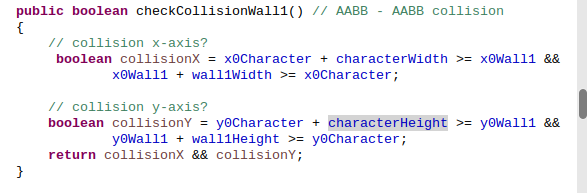
As we can see, the function checkCollisionWall1 includes a formula for the collision in x axis and for the collision in y axis and only if it is fullfilled both, it is produced a collision. In the formula appears two differents graphics objects: 1. Character (characterWidth and characterHeight are the width of the Personaje and the height of the Personaje respectively) y 2. Wall1. The formula let to any two objects that it is wanted to study if they have collision:
public boolean checkCollision() // AABB - AABB collision
	{
		// collision x-axis?
		 boolean collisionX = x0Object1 + widthObject1 >= x0Object2 &&
	    		x0bject2 + widthObject2 >= x0Object1;

		// collision y-axis?
	    boolean collisionY = y0Object1 + heightObject1 >= y0Object2 &&
	    		y0Object2 + heightObject2 >= y0Object1;
	    return collisionX && collisionY;
	}
We do the calling to checkCollisionWall1, in the display method, subsequent to if(movetoright) and to if(movetoleft) sentences:
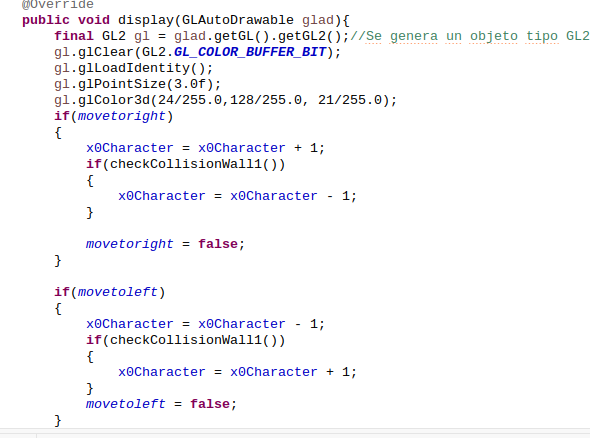
Now, our videogame, have the collsion detection implemented and the code looks like this:
1. The use of the function checkCollisionWall1:
public void display(GLAutoDrawable glad){
    	final GL2 gl = glad.getGL().getGL2();//Se genera un objeto tipo GL2
    	gl.glClear(GL2.GL_COLOR_BUFFER_BIT);
    	gl.glLoadIdentity();
    	gl.glPointSize(3.0f);
    	gl.glColor3d(24/255.0,128/255.0, 21/255.0);
    	if(movetoright)
    	{
    		x0Character = x0Character + 1;
    		if(checkCollisionWall1())
    		{
    			x0Character = x0Character - 1;
    		}

    		movetoright = false;
    	}

    	if(movetoleft)
    	{
    		x0Character = x0Character - 1;
    		if(checkCollisionWall1())
    		{
    			x0Character = x0Character + 1;
    		}
    		movetoleft = false;
    	}
    	drawCharacter(glad, x0Character, y0Character, characterWidth);
    	drawEnemy(glad, x0Enemy, y0Enemy, EnemyWidth);
    	drawStage(glad, x0Stage, y0Stage, stageWidth, stageHeight);
    	drawWall1(glad, x0Wall1, y0Wall1, wall1Width, wall1Height);
In the function (checkCollisionWall1) declaration:
		gl.glVertex2f(x1,y1);
		gl.glEnd();
	}

	public boolean checkCollisionWall1() // AABB - AABB collision
	{
		// collision x-axis?
		 boolean collisionX = x0Character + characterWidth >= x0Wall1 &&
	    		x0Wall1 + wall1Width >= x0Character;

		// collision y-axis?
	    boolean collisionY = y0Character + characterHeight >= y0Wall1 &&
	    		y0Wall1 + wall1Height >= y0Character;
	    return collisionX && collisionY;
	}


   @Override
   public void dispose(GLAutoDrawable arg0) {
And in the drawCharacter() method:
if(jump) {y0Character = y0Character + characterHeight * 2.0f;jump=false;
		ground=false;falling=true;}
		else if(falling)
		{
			while(falling)
			{
				y0Character = y0Character - 0.1f;

				if(checkCollisionWall1()) //falling (en y0)colisiona con parte superior de Muro1
				{
					heClimbedOntoAWall=true;
					falling=false;
					ground = true;
				}

			}
		}
		gl.glEnable(GL2.GL_TEXTURE_2D);
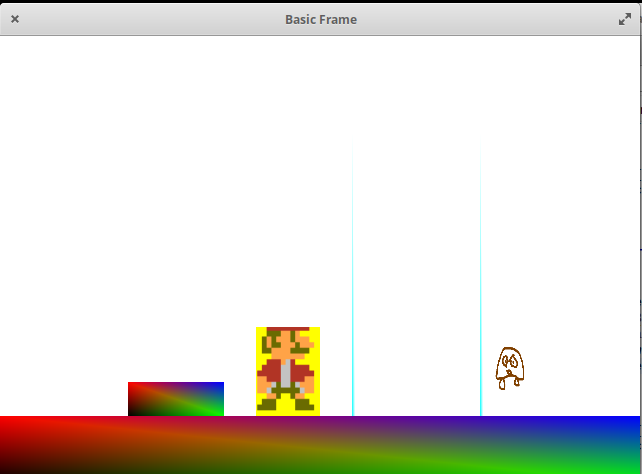
We have the game with our main character functional, but, what if the Enemy touch to Mario or if Mario jumps over the Enemy?
if(checkCollisionCharacterAndEnemy())
    		{
    			System.out.println("y0Character: "+y0Character+ " y0Enemy: "+y0Enemy);
    			if(y0Character >= y0Enemy + EnemyHeight-1.0f)//(-1.0f->1 pixel)
    			{
    				x0Enemy = x0Enemy + 120.0f;
    			}
    			else //no contacto desde la función de drawCharacter de la acción jump sobre el enemy
    			{
    				x0Character = x0Character +120.0f;
        			x0Enemy = x0Enemy + 1.0f;
    			}
    		}
And in the action of jump over the Enemy by the main character (in the drawCharacter() method):
if(jump) {y0Character = y0Character + characterHeight * 2.0f;jump=false;
		ground=false;falling=true;}
		else if(falling)
		{
			while(falling)
			{
				y0Character = y0Character - 0.1f;

				if(checkCollisionWall1()) //falling (en y0)colisiona con parte superior de Muro1
				{
					heClimbedOntoAWall=true;
					System.out.println("heClimbedOntoAWall: "+heClimbedOntoAWall);
					falling=false;
					ground = true;
				}
				if(checkCollisionCharacterAndEnemy())
				{
					if(y0Character >= y0Enemy + EnemyHeight-1.0f) //(-1.0f)El pixel-primera fila del Personaje al tocar con la y0Enemy+EnemyHeight
	    			{
	    				x0Enemy = x0Enemy + 120.0f;
	    			}
					falling = false;
				}
			}
		}
I have got that the character (Mario like) when he go beyond the stage extreme, the character fall down of the stage. The code that i have used is this:
if((!checkCollisionStageFloor()) && (!checkCollisionWall1()) &&(!falling))
    	{//we are in a free fall by the two (vertical) sides of the stage
    		falling = true;
    		ground=false;
    		while(y0Character > 0.1f)
    		{
    			y0Character = y0Character - 0.1f;
    		}
    	}
I have updated the if (checkCollisionWall1) of the the if (muevederecha) and of the if(mueveizquierda) with a second condition that looks if we are or if we aren’t over the Wall1, this is the code:
if(movetoright)
    	{
    		x0Character = x0Character + 1;
    		if((checkCollisioWall1())&&(y0Personaje<0.1f+1.5f))//0.1f of the of height of the Wall1, plus 1.5f initial of the character. It is the  minimum that will be the character above the stage floor if he is on a wall.
    		{
    			x0Character = x0Character - 1;
    		}
If(movetoleft) has analogous behaviour.
In the texture alternation in the main character i have located the code fragment in the display function:
gl.glEnable(GL2.GL_TEXTURE_2D);
		if((saltar)||(cayendo))
		{
		    t2.enable(gl);
		    t2.bind(gl);
		}
		else{
			t.enable(gl);
			t.bind(gl);
} 1
1
 20
20
 20
20
Leave a Reply