
Welcome to the 2D Game Development Course with Java and OpenGL. In this series, we will build a 2D platformer inspired by classics like Mario Bros. This project serves as a comprehensive introduction to the world of graphics programming using JOGL (Java Binding for the OpenGL).
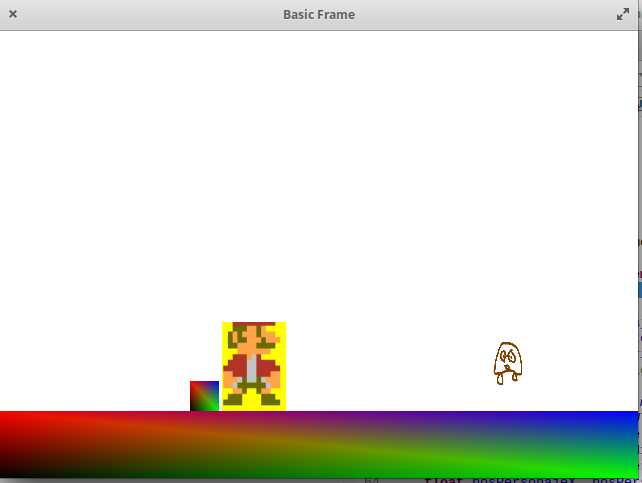
1. Project Architecture
Developing a videogame requires a structured approach. Our project will be divided into five core programming phases:
Texturing: Applying images to our 2D primitives.
Graphics Rendering: Loading characters, backgrounds, and tiles.
Input Handling: Implementing keyboard controls.
Collision Detection: Managing interactions between objects.
Game Logic: Defining the rules and physics of the world.
First, and to be able of testing, we are going to load the graphics, the scenary, the main character, the block or wall and the enemy. We go to starting with the elements graphics, we will continue with the textures, after we will have the controls, and to finalize we will have collision detection plus the videogame logic.
2. Preparing the Assets
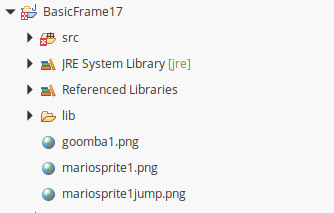
To begin testing, we will use three essential sprites. Place these images in the root directory of your Java project:

: Mario’s idle state.

: Mario’s jumping animation.
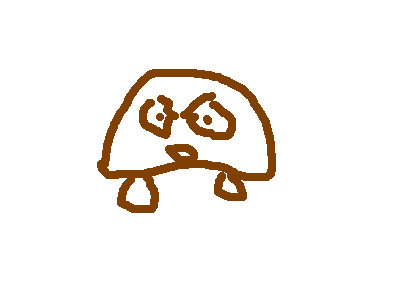
: The basic enemy.
3. Setting up the Development Environment (IDE)
We will use Eclipse IDE (Linux or Windows). Follow these steps to configure the OpenGL libraries:
Downloading JOGL Libraries
You need the following .jar files from the official JogAmp repository:
gluegen-rt.jarjogl-all.jarjogl-all-natives-[your-os].jargluegen-rt-natives-[your-os].jar
Configuring the Build Path
Ensure your /src folder is clean (remove module-info.java if present).
Create a folder named /lib in your project.
Drag and drop the downloaded JARs into this folder.
Right-click each JAR -> Build Path -> Add to Build Path.
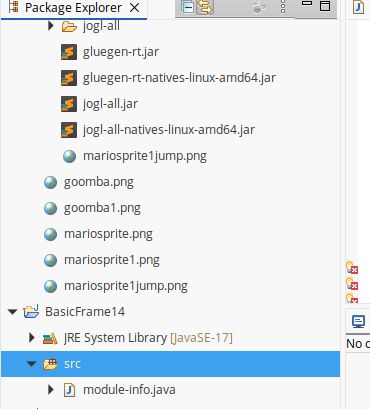
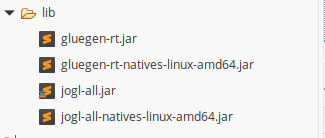
Once downloaded the four libraries, we create in our project, the folder lib, where we copy dragging and dropping the four libraries:
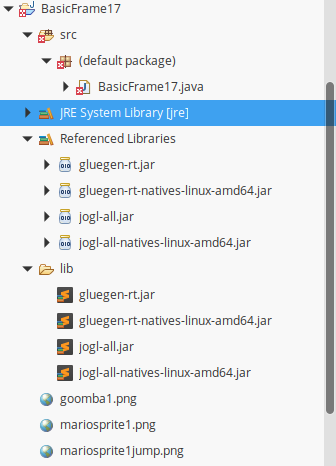
Now, leave the folder src empty, that is without the module-info.java created by default. And we create in src folder the JAVA Class: BasicFrame17.java.
Now, we are in position of beginning to code our videogame:
4. Implementing the Basic Frame
To render graphics, we must implement the GLEventListener interface. This requires three fundamental methods:
display(): Called continuously to render the frames.
dispose(): Handles memory cleanup.
reshape(): Adjusts the viewport when the window is resized.
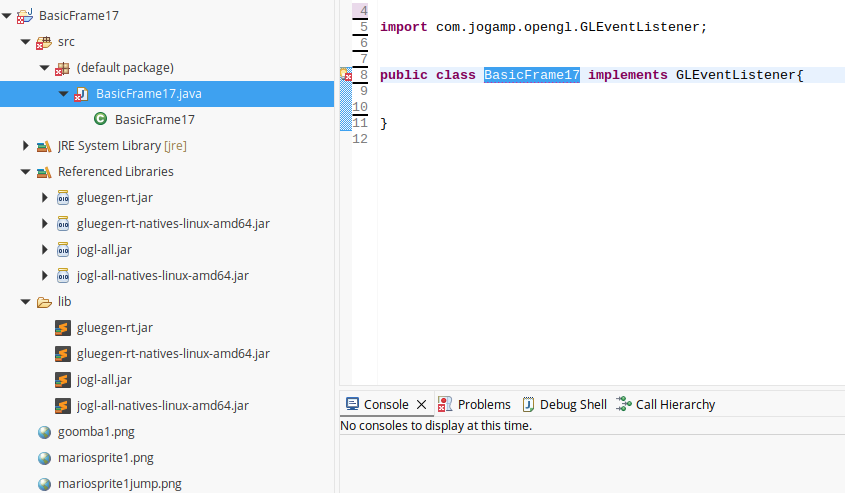
This three methods are necessary to implement for run an OpenGL Java (JOGL) application.
5. The Core Code: BasicFrame.java
Below is the initial setup for our game window, including the Animator (which creates the game loop) and the Key Listener for movement.:
import java.awt.Frame;
import java.awt.event.KeyEvent;
import java.awt.event.KeyListener;
import java.awt.event.WindowAdapter;
import java.awt.event.WindowEvent;

import com.jogamp.opengl.GLCapabilities;
import com.jogamp.opengl.GLEventListener;
import com.jogamp.opengl.GLProfile;
import com.jogamp.opengl.awt.GLCanvas;
import com.jogamp.opengl.util.Animator;
public class BasicFrame17 implements GLEventListener{
	static boolean lookup, lookdown, movetoleft, movetoright, jump;
	public static void main(String[] args) {


	      //getting the capabilities object of GL2 profile
	      final GLProfile profile = GLProfile.get(GLProfile.GL2);
	      GLCapabilities capabilities = new GLCapabilities(profile);

	      // The canvas
	      final GLCanvas glcanvas = new GLCanvas(capabilities);
	      BasicFrame17 b = new BasicFrame17();
	      glcanvas.addGLEventListener(b);

	      glcanvas.setSize(400, 400);

	      //creating frame
	      final Frame frame = new Frame (" Basic Frame");

	      frame.addKeyListener(new KeyListener(){
	    	  public void keyPressed(KeyEvent ke)
	    		{
	    			switch(ke.getKeyCode())
    			{
    			case KeyEvent.VK_CONTROL:jump = true;
    			System.out.println(movetoright);
    			break;
    			case KeyEvent.VK_DOWN:lookdown = true;
    			break;
    			case KeyEvent.VK_UP:lookup = true;
    			break;
    			case KeyEvent.VK_LEFT:movetoleft = true;
    			System.out.println(movetoleft);
    			break;
    			case KeyEvent.VK_RIGHT:movetoright = true;
    			System.out.println("movetoright: "+movetoright);
    			break;
    			}
	    		}

	    		public void keyReleased(KeyEvent ke)
	    		{
	    		}

	    		public void keyTyped(KeyEvent ke)
	    		{

	    		}
	      });
	      final Animator animator = new Animator(glcanvas);
	      frame.addWindowListener(new WindowAdapter() {

	    	  @Override
	          public void windowClosing(WindowEvent e) {
	             // Use a dedicate thread to run the stop() to ensure that the
	             // animator stops before program exits.
	             new Thread() {
	                @Override
	                public void run() {
	                   if (animator.isStarted()) animator.stop();
	                   System.exit(0);
	                }
	             }.start();
	          }
	      });
	      animator.start();

	      //adding canvas to frame
	      frame.add(glcanvas);
	      //frame.setExtendedState(Frame.MAXIMIZED_BOTH);
	      frame.setSize( 640, 480 );
	      frame.setVisible(true);


	}
}
🚩 Phase 1: Implementing the Display Method and Rendering Graphics
In this section, we will focus on the display() method. This is the heart of our game engine, as it is responsible for drawing every frame on the screen and updating the position of our characters based on user input.
1. The Role of the init() and display() Methods
Before we draw, we need to set the stage:
init(): This method runs once when the application starts. We use it to initialize global variables, reset movement booleans, and prepare the OpenGL context.display(): This method is called repeatedly by theAnimator. It clears the screen, updates the character’s coordinates (logic), and then calls the specific drawing functions for each element.
2. Modernizing Character Movement Logic
To keep our code clean, we separate the drawing logic into modular functions. This makes the code easier to maintain and debug.
@Override
public void display(GLAutoDrawable glad) {
    final GL2 gl = glad.getGL().getGL2();
    gl.glClear(GL2.GL_COLOR_BUFFER_BIT); // Clear the screen
    gl.glLoadIdentity(); // Reset transformations

    // Movement Logic
    if (movetoright) {
        x0Character += 1.0f;
        movetoright = false; // Reset flag after movement
    }
    if (movetoleft) {
        x0Character -= 1.0f;
        movetoleft = false;
    }

    // Rendering all game elements
    drawCharacter(glad, x0Character, y0Character, characterWidth);
    drawEnemy(glad, x0Enemy, y0Enemy, enemyWidth);
    drawStage(glad, x0Stage, y0Stage, stageWidth, stageHeight);
    drawWall1(glad, x0Wall1, y0Wall1, wall1Width, wall1Height);
}
3. Understanding OpenGL Quads and Coordinates
To draw 2D objects in OpenGL, we use GL_QUADS. A quad is defined by four vertices. The order is crucial: top-left, top-right, bottom-right, and bottom-left.
Rendering the Scenery and Walls
The scenery and walls are the static (or semi-static) elements of our world. We use glColor3f to define their base colors during development before we apply final textures.
public void drawStage(GLAutoDrawable glad, float x1, float y1, float width, float height) {
    final GL2 gl = glad.getGL().getGL2();
    gl.glLoadIdentity();
    gl.glBegin(GL2.GL_QUADS);
        gl.glColor3f(1, 0, 0); // Red
        gl.glVertex2f(x1, y1 + height);
        gl.glColor3f(0, 0, 1); // Blue
        gl.glVertex2f(x1 + width, y1 + height);
        gl.glColor3f(0, 1, 0); // Green
        gl.glVertex2f(x1 + width, y1);
        gl.glColor3f(0, 0, 0); // Black
        gl.glVertex2f(x1, y1);
    gl.glEnd();
}
4. Advanced Logic: Jumping and Physics
The drawCharacter function does more than just drawing; it handles the gravity and jump state. We use a simple state machine:
- Jump: If the jump key is pressed, we increase the Y coordinate.
- Falling: If the character is in the air, gravity pulls it down until a collision is detected.
- Texture Mapping: We use
glTexCoord2fto map our Mario sprites onto the quads.
Key Concept: Notice that we switch textures depending on whether the character is jumping or falling. This creates the illusion of animation.
// Logic snippet for jumping and falling
if(jump) {
    y0Character += characterHeight * 2.0f;
    jump = false;
    falling = true;
} else if(falling) {
    y0Character -= 0.1f; // Gravity effect
    // Check for collisions to stop falling
    if(checkCollisionStageFloor()) {
        falling = false;
    }
}
5. Enemy Rendering
The enemy (Goomba) follows a similar rendering logic. By enabling GL_TEXTURE_2D, we can apply the .png images we loaded earlier to the geometric shapes.
public void drawEnemy(GLAutoDrawable glad, float x1, float y1, float width) {
    final GL2 gl = glad.getGL().getGL2();
    gl.glEnable(GL2.GL_TEXTURE_2D);
    t3.bind(gl); // Binding the Goomba texture
    gl.glBegin(GL2.GL_QUADS);
        gl.glTexCoord2f(0.0f, 1.0f); gl.glVertex2f(x1, y1 + width * 2);
        gl.glTexCoord2f(1.0f, 1.0f); gl.glVertex2f(x1 + width, y1 + width * 2);
        gl.glTexCoord2f(1.0f, 0.0f); gl.glVertex2f(x1 + width, y1);
        gl.glTexCoord2f(0.0f, 0.0f); gl.glVertex2f(x1, y1);
    gl.glEnd();
}
🚩 Phase 2: Texture Mapping and Asset Management in JOGL
In a videogame, graphics are more than just colored shapes. To bring our world to life, we need to map images (textures) onto our geometry. In this module, we will implement the logic to load .png files and toggle between them based on the character’s state.
1. Initializing the Graphics Engine (init)
The init() method is where we define the coordinate system and load our assets into memory. Using gluOrtho2D, we set a workspace from 0 to 10 on both axes. This makes positioning objects much more intuitive than using normalized device coordinates.
Loading Textures with TextureIO
We use the TextureIO utility to convert image files into OpenGL textures. We will handle three main assets:
- Idle Mario: For normal movement.
- Jumping Mario: For air states.
- Goomba: Our primary enemy.
// Logic for loading textures in the init() method
try {
    File in = new File("mariosprite1.png");
    // We use RGBA to support transparency (Alpha Channel)
    TextureData data = TextureIO.newTextureData(gl.getGLProfile(), in, GL2.GL_RGBA16, GL2.GL_RGBA, false, "png");
    t = TextureIO.newTexture(data);
} catch(IOException e) {
    System.err.println("Error loading textures: " + e.getMessage());
    System.exit(1);
}
2. State-Based Texture Switching
A key feature of our game is the ability to change Mario’s appearance when he jumps. This is achieved by checking the jump or falling boolean variables inside the rendering function.
The drawCharacter Logic
We use t.enable(gl) and t.bind(gl) to tell OpenGL which image to “paint” on the next quad.
- If jumping/falling: Bind
t2(Jumping Sprite). - If on the ground: Bind
t(Normal Sprite).
gl.glEnable(GL2.GL_TEXTURE_2D);

if (jump || falling) {
    t2.enable(gl);
    t2.bind(gl);
} else {
    t.enable(gl);
    t.bind(gl);
}

// Drawing the Quad with Texture Coordinates
gl.glBegin(GL2.GL_QUADS);
    gl.glTexCoord2f(0.0f, 1.0f); gl.glVertex2f(x1, y1 + width*2);
    gl.glTexCoord2f(1.0f, 1.0f); gl.glVertex2f(x1 + width, y1 + width*2);
    gl.glTexCoord2f(1.0f, 0.0f); gl.glVertex2f(x1 + width, y1);
    gl.glTexCoord2f(0.0f, 0.0f); gl.glVertex2f(x1, y1);
gl.glEnd();
3. Integrated Game Code (BasicFrame17)
Here is the refined structure of our main class. Note how the Input Listener updates global flags, which the Display method then uses to calculate movement and choose the correct texture.
Component Responsibility
GLCanvas The drawing surface for OpenGL.Animator Drives the display() method at a steady frame rate.
TextureIO Manages the memory and loading of PNG assets.
glTexCoord2f Maps specific corners of the image to corners of the Quad.
Key Technical Note: Alpha Blending
To ensure our sprites don’t have ugly square backgrounds, we must enable Blending. This allows the transparent parts of our PNGs to work correctly: gl.glEnable(GL2.GL_BLEND);
🚩 Phase 3: Axis-Aligned Bounding Box (AABB) Collision Detection
In 2D game development, the most efficient way to detect if two objects touch is the AABB (Axis-Aligned Bounding Box) method. This algorithm checks if the rectangular boundaries of two sprites overlap on both the X and Y axes.
1. The Collision Formula
A collision occurs only if the objects overlap in both dimensions. If they overlap on the X-axis but not the Y-axis (or vice versa), there is no contact.
Implementation in Java:
public boolean checkCollision(float x1, float y1, float w1, float h1,
                              float x2, float y2, float w2, float h2) {
    // Check overlap on X-axis
    boolean collisionX = x1 + w1 >= x2 && x2 + w2 >= x1;
    // Check overlap on Y-axis
    boolean collisionY = y1 + h1 >= y2 && y2 + h2 >= y1;

    return collisionX && collisionY;
}
2. Preventing “Wall Walking”
In our display() method, we check for collisions immediately after a movement input. If a collision is detected with a wall, we undo the movement (reverting the character’s position) to create the effect of a solid barrier.
if(movetoright) {
    x0Character += 1.0f; // Try to move
    if(checkCollisionWall1()) {
        x0Character -= 1.0f; // Collision detected! Undo movement
    }
    movetoright = false;
}
3. Advanced Interaction: Mario vs. Enemy
Collision detection isn’t just for blocking movement; it’s also for game logic. In a platformer, the outcome depends on where the collision happens:
- Top Collision: If Mario’s feet (
y0Character) are above the Enemy’s head, the Enemy is defeated (we move it out of the screen). - Side Collision: If they touch horizontally, Mario takes damage or is pushed back.
if(checkCollisionCharacterAndEnemy()) {
    // Check if Mario is landing on top of the enemy (with a small offset)
    if(y0Character >= y0Enemy + EnemyHeight - 0.01f) {
        x0Enemy += 120.0f; // Enemy "defeated" (teleported away)
    } else {
        // Mario was touched from the side
        x0Character += 120.0f; // Mario "dies" or respawns
    }
}
4. Gravity and “The Edge of the World”
A common feature in platformers is falling off ledges. We implement this by checking if Mario is NOT touching the floor and NOT touching a wall while not already in a “falling” state.
// Logic for falling off the stage
if(!checkCollisionStageFloor() && !checkCollisionWall1() && !falling) {
    falling = true;
    ground = false;

    // Simple gravity loop to pull the character down
    while(y0Character > 0.1f) {
        y0Character -= 0.1f;
    }
}
5. Dynamic Sprite Selection (Visual State Management)
To ensure the player receives visual feedback when jumping or falling, we implement a Texture Switcher within the display() function. By checking the state variables we defined in the collision logic (jump and falling), the engine chooses the correct sprite in real-time.
This technique is essential for game “feel,” as it differentiates between a character standing on solid ground and a character in mid-air.
Implementation:
// Logic for texture alternation based on character state
gl.glEnable(GL2.GL_TEXTURE_2D);

if (jump || falling) {
    // Activate the jumping/airborne texture (t2)
    t2.enable(gl);
    t2.bind(gl);
} else {
    // Revert to the idle/walking texture (t) when on the ground
    t.enable(gl);
    t.bind(gl);
}
Key Technical Takeaways:
t.enable(gl): Prepares the OpenGL pipeline to use 2D texturing.t.bind(gl): Tells the GPU which specific image (loaded ininit()) to map onto the next primitive drawn.- State Priority: Notice that the
ifcondition checks forjumporfallingfirst, giving movement graphics priority over the idle state.
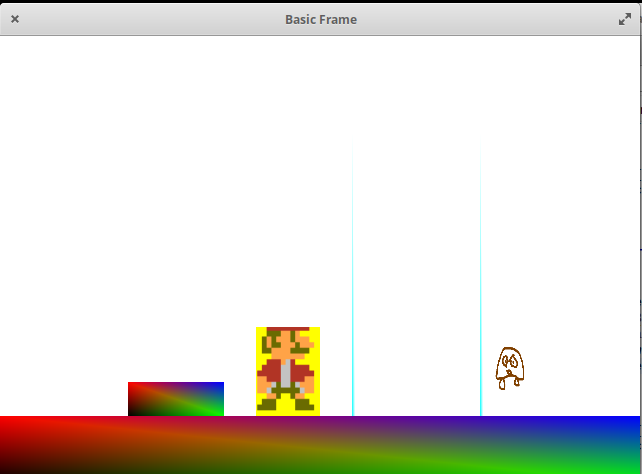
And our videogame is complete!, his code:
import com.jogamp.opengl.GL2;
import com.jogamp.opengl.GLAutoDrawable;
import com.jogamp.opengl.GLCapabilities;
import com.jogamp.opengl.GLEventListener;
import com.jogamp.opengl.GLException;
import com.jogamp.opengl.GLProfile;
import com.jogamp.opengl.awt.GLCanvas;
import com.jogamp.opengl.glu.GLU;
import com.jogamp.opengl.util.gl2.GLUT;
import com.jogamp.opengl.util.texture.Texture;
import com.jogamp.opengl.util.texture.TextureData;
import com.jogamp.opengl.util.texture.TextureIO;

import com.jogamp.opengl.util.Animator;
import com.jogamp.opengl.util.GLBuffers;

import java.awt.event.AWTEventListener;
import java.awt.event.KeyEvent;
import java.awt.event.KeyListener;
import java.awt.event.WindowEvent;
import java.awt.image.BufferedImage;
import java.io.ByteArrayInputStream;
import java.io.ByteArrayOutputStream;
import java.io.File;
import java.io.IOException;
import java.io.InputStream;
import java.nio.IntBuffer;
import java.nio.file.Files;
import java.nio.file.Paths;
import java.awt.event.WindowAdapter;
import java.lang.String;

import java.awt.Frame;
import java.time.Clock;
import java.time.ZoneId;
import java.util.Base64;

import javax.imageio.ImageIO;
import java.util.concurrent.TimeUnit;

public class BasicFrame17 implements GLEventListener{
        GL2 gl;
        GLU glu;
        float x0Stage, y0Stage ,x0Character, y0Character;
        static boolean lookup, lookdown, movetoleft, movetoright, jump, falling, heClimbedOntoAWall;
        Clock clock = Clock.systemUTC();
        float x0Wall1, y0Wall1, wall1Width, wall1Height;
        float characterWidth = 1f, CharacterHeight, stageWidth = 10f, StageHeight, EnemyWidth, EnemyHeight;
        private int texture, texture2, texture3; Texture t2,t,t3;
        IntBuffer textureNames;
        private Texture characterTexture1, goomba;
        @Override
    public void display(GLAutoDrawable glad){
        final GL2 gl = glad.getGL().getGL2();//Se genera un objeto tipo GL2
        gl.glClear(GL2.GL_COLOR_BUFFER_BIT);
        gl.glLoadIdentity();
        gl.glPointSize(3.0f);
        gl.glColor3d(24/255.0,128/255.0, 21/255.0);
        if(movetoright)
    	{
    		x0Character = x0Character + 1;
    		if((checkCollisionMuro1())&&(y0Character<0.1f+1.5f-0.1f))//0.1f(of the 0.5f - height of wall1) plus 1.5f of y0Character initials. it's the minimun that the main character is over the stage floor if the main character is on a wall.(for if the character isn't on a wall that it repels to this)
    		{
    			x0Character = x0Character - 1;
    		}

    		movetoright = false;
    		if(checkCollisionCharacterAndEnemy())
    		{
    			System.out.println("y0Character: "+y0Character+ " y0Enemy: "+y0Enemy);
    			if(y0Character >= y0Enemy + EnemyHeight-0.01f) //(-0.01f)The first row of píxels (1 píxel of height) of the main character touching with the y0Enemy+EnemyHeight
    			{
    				x0Enemy = x0Enemy + 120.0f;
    			}
    			else //no contacto desde la función de drawCharacter de la acción jump sobre el enemy
    			{
    				x0Character = x0Character +120.0f;
        			x0Enemy = x0Enemy + 1.0f;
    			}
    		}
    		//reiniciamos movetoright, para otro keypress de tecwidth
    	}

    	if(movetoleft)
    	{
    		x0Character = x0Character - 1;
    		if((checkCollisionMuro1())&&(y0Personaje<0.1f+1.5f-0.1f))//0.1f(of the 0.5f - height of wall1) plus 1.5f of y0Character initials. it's the minimun that the main character is over the stage floor if the main character is on a wall.(for if the character isn't on a wall that it repels to this)
    		{
    			x0Character = x0Character + 1;
    		}
    		movetoleft = false;
    		if(checkCollisionCharacterAndEnemy())
    		{
    			System.out.println("y0Character: "+y0Character+ " y0Enemy: "+y0Enemy);
    			if(y0Character >= y0Enemy + EnemyHeight-1.0f)//(-1.0f->1 pixel)
    			{
    				x0Enemy = x0Enemy + 120.0f;
    			}
    			else //no contacto desde la función de drawCharacter de la acción jump sobre el enemy
    			{
    				//x0Character = x0Character +120.0f;
        			//x0Enemy = x0Enemy - 1.0f;
    			}
    			System.out.println("Entra En checkCollision Personaje y Enemy");
    		}
    	}
        drawCharacter(glad, x0Character, y0Character, characterWidth);
        drawEnemy(glad, x0Enemy, y0Enemy, EnemyWidth);
        drawStage(glad, x0Stage, y0Stage, stageWidth, stageHeight);
        drawWall1(glad, x0Wall1, y0Wall1, wall1Width, wall1Height);

if(heClimbedOntoAWall)
		{
			if(checkCollisionWall1())
			{
				heClimbedOntoAWall=true;
			}
			else if((!jump)&&(!falling))
			{
				heJumpedOffAWall=true;
				heClimbedOntoAWall = false;
				System.out.println("heJumpedOffAWall: "+heJumpedOffAWall);
				ground = false;
			}
			while((heJumpedOffAWall)&&(!ground))
			{
				if(checkCollisionStageFloor())
				{
					ground=true;
					heJumpedOffAWall=false;
				}
				else if(checkCollisionWall(x0Character, y0Character, characterWidth, characterHeight, x0Wall1, y0Wall1, wall1Width, wall1Height))//Para colision con cualquier Muro
				{
					ground = true;
					heClimbedOntoAWall = true;
					heJumpedOffAWall=false;
				}
				else {
					y0Character = y0Character - 0.1f;
				}
			}
		}
    	if((!checkCollisionStageFloor()) && (!checkCollisionWall1()) &&(!falling))
    	{//estamos en una caída libre por los dos widths del escenario
    		falling = true;
    		ground=false;
    		while(y0Character > 0.1f)
    		{
    			y0Character = y0Character - 0.1f;
    		}
    	}

    	gl.glEnable(GL2.GL_TEXTURE_2D);
		if((jump)||(falling))
		{
		    t2.enable(gl);
		    t2.bind(gl);
		}
		else{
			t.enable(gl);
			t.bind(gl);
		}
    	gl.glFlush();
	}


        public void drawStage(GLAutoDrawable glad, float x1, float y1, float width, float height) {
                final GL2 gl = glad.getGL().getGL2(); //Se carga el elemento GL
                gl.glLoadIdentity(); // Reset The View
                gl.glPointSize(12f);
                gl.glBegin(GL2.GL_QUADS);//Se comienza a dibujar los puntos
                gl.glColor3f(1, 0, 0);//Se activa el color rojo
                gl.glVertex2f(x1, y1+height); //Se dibuja el punto
                gl.glColor3f(0, 0, 1);//Se activa el color azul
                gl.glVertex2f(x1+width, y1+height);
                gl.glColor3f(0, 1, 0);//Se activa el color verde
                gl.glVertex2f(x1+width, y1);
                gl.glColor3f(0, 0, 0);//Se desactivan todos los colores
                gl.glVertex2f(x1, y1);
                gl.glEnd();
        }

public void drawWall1(GLAutoDrawable glad, float x1, float y1, float width, float Wall1height) {
                final GL2 gl = glad.getGL().getGL2(); //Se
                gl.glLoadIdentity(); // Reset The View
                gl.glPointSize(12f);
                gl.glBegin(GL2.GL_QUADS);//Se comienza a dibujar los puntos
                gl.glColor3f(1, 0, 0);//Se activa el color rojo
                gl.glVertex2f(x1, y1+Wall1height*1.5f); //Se dibuja el punto
                gl.glColor3f(0, 0, 1);//Se activa el color azul
                gl.glVertex2f(x1 + width, y1+Wall1height*1.5f);
                gl.glColor3f(0, 1, 0);//Se activa el color verde
                gl.glVertex2f(x1+width, y1);
                gl.glColor3f(0, 0, 0);//Se desactivan todos los colores
                gl.glVertex2f(x1, y1);
                gl.glEnd();
        }


public void drawCharacter(GLAutoDrawable glad, float x1, float y1, float width) {
                final GL2 gl = glad.getGL().getGL2(); //Se carga el elemento GL
                gl.glLoadIdentity(); // Reset The View
                gl.glPointSize(12f);
                /*GLQUADS ORDER: top left.
                top right.
                bottom right.
                bottom left*/
                //x1 = x1 + incx;

                if(jump) {y0Character = y0Character + characterHeight * 2.0f;jump=false;
                ground=false;falling=true;}
                else if(falling)
                {
                        while(falling)
                        {
                                y0Character = y0Character - 0.1f;

                                if(checkCollisionWall1()) //falling (en y0)collision with superior part of Wall1
                                {
                                        heClimbedOntoAWall=true;
                                        falling=false;
                                        ground = true;

                                }
                                if(checkCollisionStageFloor())
                                {
                                        falling=false;
                                        ground=true;
                                }
                                if(checkCollisionCharacterAndEnemy())
                                {
                                        if(y0Character >= y0Enemy + EnemyHeight-0.01f) //(-0.01f)The first row of píxels (1 píxel of height) of the main character touching with the y0Enemy+EnemyHeight
                                {

                                        x0Enemy = x0Enemy + 120.0f;
                                }
                                        falling = false;
                                }
                        }

                        //falling=false;
                        //ground = true;
                }
                gl.glEnable(GL2.GL_TEXTURE_2D);
                if((jump)||(falling))
                {
                    t2.enable(gl);
                    t2.bind(gl);
                }
                else{
                        t.enable(gl);
                        t.bind(gl);
                }
                gl.glBegin(GL2.GL_QUADS);//Se comienza a dibujar los puntos
                gl.glColor4f(1.0f, 1.0f, 1.0f, 1.0f);//Se activa el color rojo
                gl.glTexCoord2f(0.0f, 1.0f);
                gl.glVertex2f(x1, y1+width+width); //Se dibuja el punto
                //gl.glColor3f(1, 0, 0);//Se activa el color azul
                gl.glTexCoord2f(1.0f, 1.0f);
                gl.glVertex2f(x1+width, y1+width+width);
                gl.glTexCoord2f(1.0f, 0.0f);
                gl.glVertex2f(x1+width, y1);
                gl.glTexCoord2f(0.0f, 0.0f);
                gl.glVertex2f(x1, y1);
                gl.glEnd();
        }


        public void drawEnemy(GLAutoDrawable glad, float x1, float y1, float width) {
                final GL2 gl = glad.getGL().getGL2(); //Se
                gl.glPointSize(12f);
                /*GLQUADS ORDER: top left.
                top right.
                bottom right.
                bottom left*/
                gl.glEnable(GL2.GL_TEXTURE_2D);
                //t3.enable(gl);
                t3.bind(gl);
                gl.glBegin(GL2.GL_QUADS);//Se comienza a dibujar los puntos
                gl.glColor4f(1.0f, 1.0f, 1.0f, 1.0f);//Se activa el color rojo
                gl.glTexCoord2f(0.0f, 1.0f);
                gl.glVertex2f(x1, y1+width+width); //Se dibuja el punto
                gl.glTexCoord2f(1.0f, 1.0f);
                gl.glVertex2f(x1+width, y1+width+width);
                gl.glTexCoord2f(1.0f, 0.0f);
                gl.glVertex2f(x1+width, y1);
                gl.glTexCoord2f(0.0f, 0.0f);
                gl.glVertex2f(x1,y1);
                gl.glEnd();
        }

public boolean checkCollisionWall1() // AABB - AABB collision
        {
                // collision x-axis?
                 boolean collisionX = x0Character + characterWidth >= x0Wall1 &&
                        x0Wall1 + wall1Width >= x0Character;

                // collision y-axis?
            boolean collisionY = y0Character + characterHeight >= y0Wall1 &&
                        y0Wall1 + wall1Height >= y0Character;
            return collisionX && collisionY;
        }


public boolean checkCollisionWall(float x0CharacterIntAFunc, float y0CharacterIntAFunc, float characterWidthIntAFunc, float characterHeightIntAFunc, float x0MuroIntAFunc, float y0MuroIntAFunc, float widthMuroIntAFunc, float heightMuroIntAFunc) // AABB - AABB collision
	{//IntAFunc de Interno a Función
		// collision x-axis?
		 boolean collisionX = x0CharacterIntAFunc + characterWidthIntAFunc >= x0MuroIntAFunc &&
	    		x0MuroIntAFunc + widthMuroIntAFunc >= x0CharacterIntAFunc;

		// collision y-axis?
	    boolean collisionY = y0CharacterIntAFunc + characterHeightIntAFunc >= y0MuroIntAFunc &&
	    		y0MuroIntAFunc + heightMuroIntAFunc >= y0CharacterIntAFunc;
	    return collisionX && collisionY;
	}

	public boolean checkCollisionStageFloor() // AABB - AABB collision
	{
		// collision x-axis?
		 boolean collisionX = x0Character + characterWidth >= x0Stage &&
	    		x0Stage + stageWidth >= x0Character;

		// collision y-axis?
	    boolean collisionY = y0Character + characterHeight >= y0Stage &&
	    		y0Stage + stageHeight >= y0Character;
	    return collisionX && collisionY;
	}


public boolean checkCollisionCharacterAndEnemy()
	// AABB - AABB collision
		{
			// collision x-axis?
			 boolean collisionX = x0Character + characterWidth >= x0Enemy &&
					 x0Enemy + EnemyWidth >= x0Character;

			// collision y-axis?
		    boolean collisionY = y0Character + characterHeight >= y0Enemy &&
		    		y0Enemy + EnemyHeight >= y0Character;
		    return collisionX && collisionY;
		}


   @Override
   public void dispose(GLAutoDrawable arg0) {
      //method body
   }

   @Override
   public void init(GLAutoDrawable glad){
           final GL2 gl = glad.getGL().getGL2(); //Se genera un objeto de tipo GL2
       final GLU glu = new GLU(); //Se genera un objeto de tipo GLU
      ground = true;
       heClimbedOntoAWall = false;
       movetoright=false;
       movetoleft=false;
       jump=false;
       x0Stage=0;//initial coordinates origin of the stage
       y0Stage=0;
       stageWidth = 10f;
       stageHeight=1.5f;
       x0Character = 4f;
       y0Character = 1.5f;
       characterWidth = 1.0f;
       characterHeight = characterWidth * 2;
       x0Wall1 = 2.0f;
       y0Wall1 = 1.5f;
       wall1Width = 1.5f;
       wall1Height = 0.5f;
       gl.glMatrixMode(GL2.GL_PROJECTION);//Modo de proyección
       gl.glClearColor(1.0f, 1.0f, 1.0f, 0.0f); //fondo blanco
       glu.gluOrtho2D(0.0, 10.0, 0.0, 10.0);//-10 a 10 en x y -10 a 10 en y
       gl.glMatrixMode(GL2.GL_MODELVIEW);
       gl.glLoadIdentity(); //Se cololoca la matriz identidad
       gl.glEnable(GL2.GL_BLEND);//para activar canal alpha trnsparen
       //gl.glBlendFunc(GL2.GL_SRC_ALPHA, GL2.GL_ONE_MINUS_SRC_ALPHA);
       gl.glEnable(GL2.GL_TEXTURE_2D); //carga texturas:
       try {
           //glActiveTexture(GL_TEXTURE0);
          // glBindTexture();
          File in = new File("mariosprite1.png");
           InputStream stream = getClass().getResourceAsStream("mariosprite1.png");
           TextureData data = TextureIO.newTextureData(gl.getGLProfile(),in, GL2.GL_RGBA16, GL2.GL_RGBA, false, "png");
           t = TextureIO.newTexture(data);
       }catch(IOException e) {
           e.printStackTrace();
           System.exit(1);
       }
       try {
           gl.glEnable(GL2.GL_TEXTURE_2D); //carga texturas:
           //carga texturas:
                        //gl.glActiveTexture(GL2.GL_TEXTURE1);
                          //gl.glActiveTexture(GL3.GL_TEXTURE0);

                        File in2 = new File("mariosprite1jump.png");
                        InputStream stream2 = getClass().getResourceAsStream("mariosprite1jump.png");
                   TextureData data2 = TextureIO.newTextureData(gl.getGLProfile(),in2, GL2.GL_RGBA16, GL2.GL_RGBA, false, "png");
                   t2 = TextureIO.newTexture(data2);
                //t2 = TextureIO.newTexture(in2, true);
                //texture2 = t2.getTextureObject(gl);
                //texture2.enable();
                //t2.enable(gl);
           //t2.bind(gl);
                System.out.println("try catch texture2: "+texture2);
                //gl.glBindTexture(GL2.GL_TEXTURE_2D, texture2);
                //gl.glTexParameteri(GL2.GL_TEXTURE_2D,GL2.GL_TEXTURE_WRAP_S,GL2.GL_CLAMP);
                //gl.glTexEnvi(GL2.GL_TEXTURE_ENV,GL2.GL_TEXTURE_ENV_MODE,GL2.GL_BLEND);
                        //gl.glBindTexture(GL2.GL_TEXTURE_2D, textureNames.get(1));
                }catch(IOException e) {
                   e.printStackTrace();
                   System.exit(2);
     }
       try {
           gl.glEnable(GL2.GL_TEXTURE_2D); //carga texturas:


                        File in3 = new File("goomba1.png");
                        InputStream stream3 = getClass().getResourceAsStream("goomba1.png");
                   TextureData data3 = TextureIO.newTextureData(gl.getGLProfile(),in3, GL2.GL_RGBA16, GL2.GL_RGBA, false, "png");
                   t3 = TextureIO.newTexture(data3);
                   goomba = TextureIO.newTexture(new File("goomba1.png"), true);

                System.out.println("try catch texture3: "+texture3);

                }catch(IOException e) {
                   e.printStackTrace();
                   System.exit(2);
     }

   }

   public static Texture loadTexture(String file) throws GLException, IOException
   {
       ByteArrayOutputStream os = new ByteArrayOutputStream();
       ImageIO.write(ImageIO.read(new File(file)), "png", os);
       InputStream fis = new ByteArrayInputStream(os.toByteArray());
       return TextureIO.newTexture(fis, true, TextureIO.PNG);
   }

   @Override
   public void reshape(GLAutoDrawable arg0, int arg1, int arg2, int arg3, int arg4) {
      // method body

   }

   public static void main(String[] args) {


      //getting the capabilities object of GL2 profile
      final GLProfile profile = GLProfile.get(GLProfile.GL2);
      GLCapabilities capabilities = new GLCapabilities(profile);

      // The canvas
      final GLCanvas glcanvas = new GLCanvas(capabilities);
      BasicFrame17 b = new BasicFrame17();
      glcanvas.addGLEventListener(b);
      //glcanvas.addKeyListener( new BasicFrame4());

      glcanvas.setSize(400, 400);

      //creating frame
      final Frame frame = new Frame (" Basic Frame");

      frame.addKeyListener(new KeyListener(){
          public void keyPressed(KeyEvent ke)
                {
                        switch(ke.getKeyCode())
                        {
                        case KeyEvent.VK_CONTROL:jump = true;
                        System.out.println(movetoright);
                        break;
                        case KeyEvent.VK_DOWN:lookdown = true;
                        break;
                        case KeyEvent.VK_UP:lookup = true;
                        break;
                        case KeyEvent.VK_LEFT:movetoleft = true;
                        System.out.println(movetoleft);
                        break;
                        case KeyEvent.VK_RIGHT:movetoright = true;
                        System.out.println("movetoright: "+movetoright);
                        break;
                        }
                }

                public void keyReleased(KeyEvent ke)
                {
                }

                public void keyTyped(KeyEvent ke)
                {

                }
      });
      final Animator animator = new Animator(glcanvas);
      frame.addWindowListener(new WindowAdapter() {

          @Override
          public void windowClosing(WindowEvent e) {
             // Use a dedicate thread to run the stop() to ensure that the
             // animator stops before program exits.
             new Thread() {
                @Override
                public void run() {
                   if (animator.isStarted()) animator.stop();
                   System.exit(0);
                }
             }.start();
          }
      });
      animator.start();

      //adding canvas to frame
      frame.add(glcanvas);
      //frame.setExtendedState(Frame.MAXIMIZED_BOTH);
      frame.setSize( 640, 480 );
      frame.setVisible(true);


   }

}
 1
1
 20
20
 20
20
Leave a Reply